
How I write faster by typing less
(plus a parallel between my hack and Zanger’s screen)

In the ’90s, when Dan Zanger still had his day job, he faced a challenge: how to keep track of the market while driving between sites all day.
His solution was to use a QuoTrek device, which you can see in action on this 1986 The Computer Chronicles show:
As Zanger explained in this 2020 interview, he inputted around 40 stocks into this device and set the delay factor to 1/10th or 1/25th of a second. The stock being run in that moment would flash up on the screen, which only showed one quote at a time.
A name dominating the screen told him which stock to play. That’s how he made his first few million while still working a full-time job.
After Zanger wound down his pool business, he replicated that QuoTrek screen with IQXP.
A key part of Zanger’s strategy is figuring out which stocks institutions are buying. So, besides replicating his little QuoTrek screen, he kept his eSignal quote window in the background with around 60 stocks, which he watched for surges in volume and how price responded to them.
But the more striking innovation are the noises in that one-minute clip: a series of hammer and coconut sounds that drove me slightly nuts. (I’m clearly no Zanger!)
Zanger’s explanation:
“In the late 90s I was using [the IQXP program] exclusively during the day. David Edson owns and writes the program. I contacted David and had him write in sound alerts. If stocks are trading on the ask it makes a hammer sound, and if trading on the bid it makes coconut sounds.
“When you have 60 stocks in your IQXP program and the market is moving up you’ll hear hammers being hit across the entire basket of stocks. If the market drifts sideways and stocks start to sell off you will start to hear coconuts. If stocks are up but you can hear a lot of coconuts you know there is selling into strength. After the market falls for two to three weeks you’ll start to hear hammer sounds as they buy the dips.”
Constraint inspires creativity — and that can permanently shape your methods even as you evolve.
For example, I still like to regularly publish on this more relaxing Substack, but am learning to slow down overall. However, that didn’t come easily to me — not after maintaining six blogs (on top of TTRH).
This was the publication schedule in my former day job:
Blog A: five articles every two weeks
Blog B: two articles a week
Blog C: two articles a week
Blog D: three articles a month
Blog E: two, sometimes three, articles a month
Blog F: two articles a month
This worked out to writing around 40 articles a month, as publication continued while I was on leave. I also wrote the company’s weekly newsletter and ghostwrote media/PR comments for about a dozen people. (I knew them well enough to be able to guess how they’d respond to the questions.)
When 35–40% of articles were data entry based and therefore partly templated, they were easier to bash out. But after the blog strategy changed in June 2024, all articles became in-depth pieces written from scratch. Quantity unchanged.
Knocking out high-quality content in that much volume meant some serious deliberate writing practice. That intensity made for an awesome training ground.
The constraints also forced me to get creative.
For example, my favourite research method is to interview the experts. That’s not just how you get the most engaging, practical content — the research itself energises you. Definitely a good thing with a heavy workload! (And a key reason I love ghostwriting.)
I also learnt to plan each month ahead, blocking out a certain number of days for each blog rather than working on the articles in order of publication. This allowed me to group them by topic and type to reduce context-switching. Plus, on any given day, I could tell all but one content requester to bugger off wait their turn.
I still try to dedicate each day to one main writing task. Far better way to work.
But the true innovation came from being forced to type fast.
For context, I touch type with a typing speed of around 100 WPM (on my favourite keyboard).
However, typos happen when you’re constantly using technical GRC terms like ‘General Data Protection Regulation’, ‘information security management system’, ‘Payment Card Industry Data Security Standard’, and many more.
Typos are deeply frustrating when you’re pushed for time.
Then I thought: “Why type these out myself every time? If I’m using the same terms over and over, why not automate them?”
Word allows you to customise your autocorrect.
When you go to ‘File’ > ‘Options’ > ‘Proofing’ > ‘AutoCorrect Options…’, you get this:
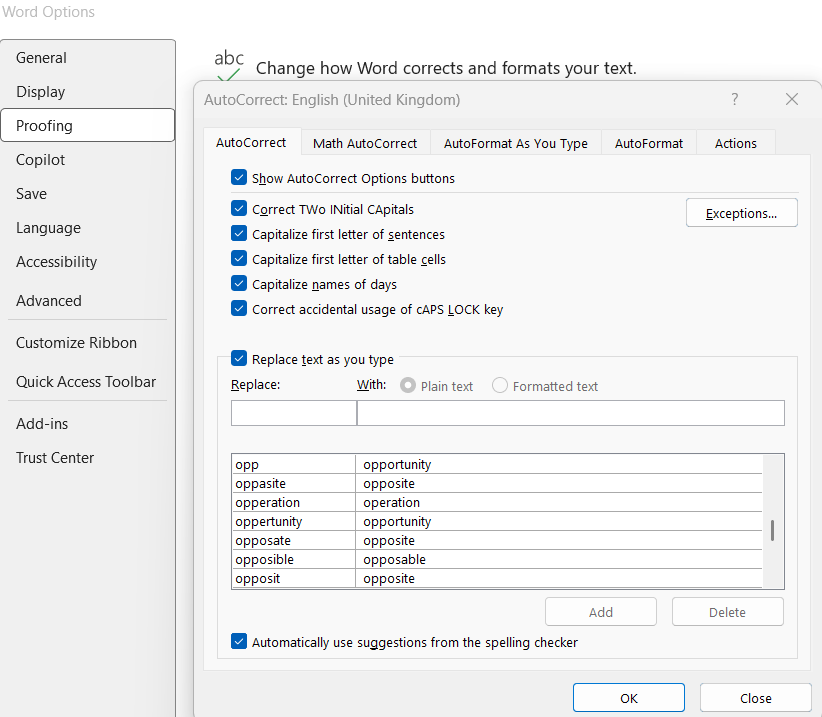
From here, you can set up your Word (for the language in use, shown at the top) to replace any input with another input. For example, for abbreviations, I use this logic:
!GDPR → General Data Protection Regulation
!ISMS → information security management system
!PCI DSS → Payment Card Industry Data Security Standard
By including the exclamation mark before the acronym/initialism, Word only changes to the written-out form when required. (You don’t want to end up reverting your autocorrect changes.)
Now, I was typing less and not wasting time correcting typos.
That encouraged me to further customise my autocorrect, changing ‘ppl’ to ‘people’, ‘opp’ to ‘opportunity’, ‘env’ to ‘environment’, and so on.
I also use this ‘hack’ to mitigate personal weaknesses. For example, when I become aware of a Dunglish mistake, I prevent recurrence via my autocorrect — e.g. ‘so long as’ (Dutch: ‘zolang als’) now automatically becomes ‘as long as’.
Similarly, because you set up the autocorrect separately per language, I’ve set up my US English version to change phrases like ‘different to’ and ‘exclamation mark’ to ‘different from’ and ‘exclamation point’, further lowering my error rate.
The bigger lesson, though?
To innovate, constrain yourself — whether via time or another way. That’s when you get creative.
- Kyna
Super smart technique, nvr thought of tht haha. Also 100 WPM is crazy